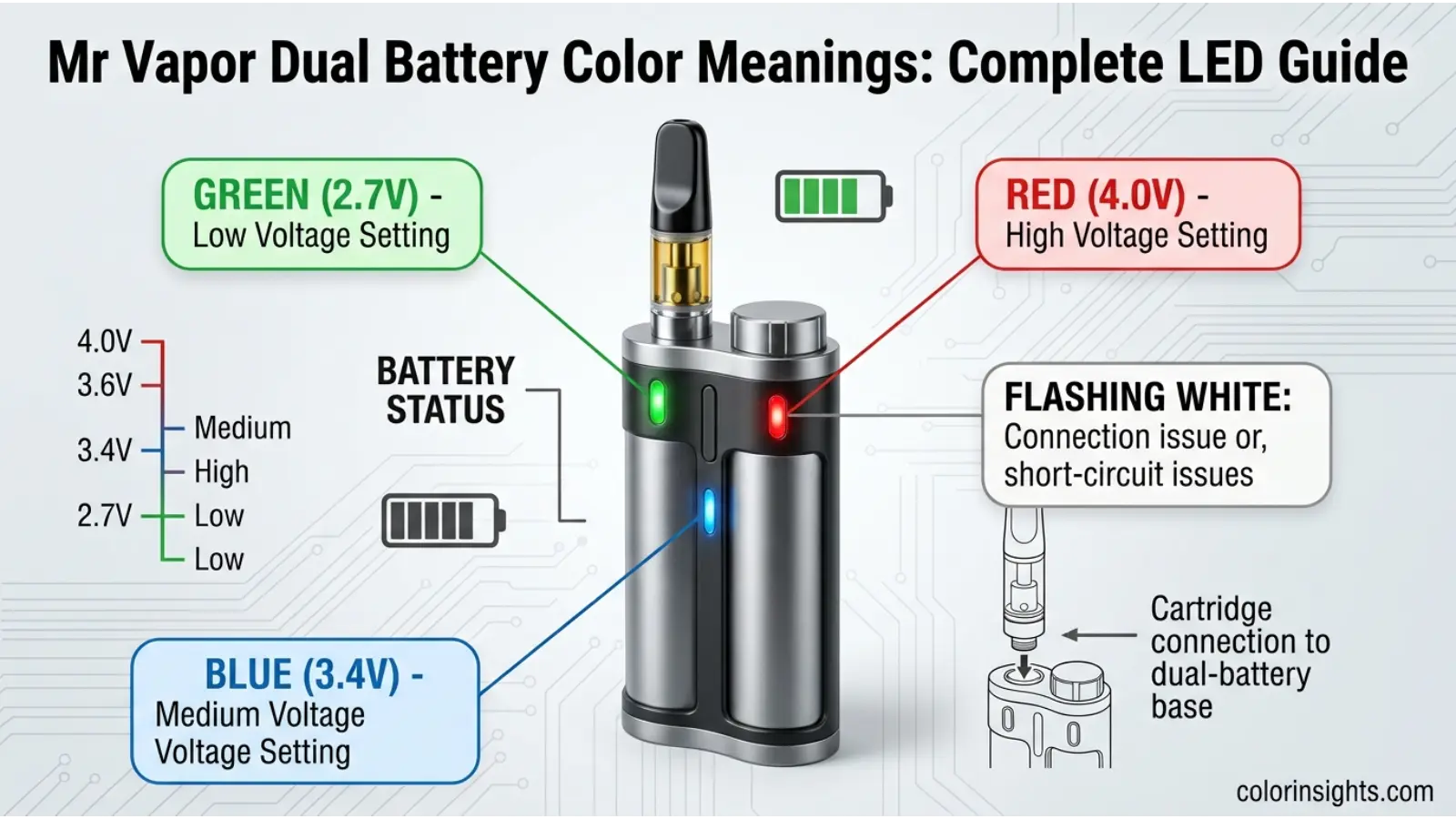
Mr Vapor Dual Battery color meanings help users understand the device’s voltage settings and certain operating or connection indicators. Unlike traditional color symbolism, these LED colors function as practical signals that communicate device status. The commonly documented adjustable-voltage version uses three primary colors: green for 2.7V, blue for 3.4V, and red for 4.0V.
A flashing white light has also been reported as an indicator of a possible cartridge connection, compatibility, or short-circuit issue. Because Mr Vapor has multiple products and online instructions are not fully consistent, users should confirm the behavior against the manual for their specific model.
Quick answer:
Green generally indicates 2.7V, blue 3.4V, and red 4.0V on the commonly documented Mr Vapor Dual Battery adjustable-voltage version. A flashing white light may indicate a connection or short-circuit problem.
What Do Mr Vapor Dual Battery Colors Mean?
The LED colors on the commonly documented Mr Vapor Dual Battery correspond primarily to voltage settings, rather than decorative color effects.
| LED Color | Commonly Reported Meaning | Voltage |
|---|---|---|
| 🟢 Green | Low voltage setting | 2.7V |
| 🔵 Blue | Medium voltage setting | 3.4V |
| 🔴 Red | High voltage setting | 4.0V |
| ⚪ Flashing white | Possible connection/short issue | — |
The voltage can reportedly be changed by pressing the power button three times to cycle through the available settings.
Green Light — 2.7V
The green light commonly indicates the lowest available voltage setting, reported as 2.7 volts.
A lower voltage setting can be useful when a user wants a less aggressive operating level. Starting at a lower setting is also commonly recommended when working with a new cartridge to avoid unnecessarily high heat.
Blue Light — 3.4V
The blue light indicates the medium setting, commonly reported as 3.4 volts.
This setting sits between the green and red options and provides a middle point for users who want to adjust from the lowest setting.
Red Light — 4.0V
The red light commonly indicates the highest listed setting, 4.0 volts.
Because higher voltage can increase heat, users should follow the cartridge manufacturer’s recommended operating range rather than assuming that the highest setting is appropriate for every cartridge.
Flashing White Light
A flashing white light has been reported as a possible connection, compatibility, or short-circuit indicator. Potential causes include an improperly connected cartridge, dirty contacts, or an incompatible cartridge.
If the device repeatedly produces an unexpected error indication, stop using it and consult the applicable instructions rather than repeatedly activating the device.
Mr Vapor Dual Battery Voltage Color Chart
The following chart provides a quick reference to the commonly reported voltage colors:
| Color | Voltage | General Setting |
|---|---|---|
| 🟢 Green | 2.7V | Low |
| 🔵 Blue | 3.4V | Medium |
| 🔴 Red | 4.0V | High |
| ⚪ Flashing White | No voltage assigned | Possible connection/error indication |
These values come from online instructions for the commonly documented adjustable-voltage Dual Battery version. They should not automatically be applied to every Mr Vapor product.
How to Change Mr Vapor Dual Battery Colors
On the commonly documented version, pressing the power button three times rapidly cycles through the voltage settings.
The reported sequence is:
Green → Blue → Red → Green
That corresponds to:
2.7V → 3.4V → 4.0V → 2.7V
The LED changes color to indicate the selected voltage.
Because device revisions can differ, check your specific product instructions if the button sequence does not behave this way.
What Does the Green Light Mean on Mr Vapor Dual Battery?
The green light generally means the device is set to 2.7V, the lowest of the commonly reported adjustable voltage options.
If you’re troubleshooting the light rather than changing voltage, first determine whether the green light is steady or flashing, because different light patterns can have different meanings.
What Does the Blue Light Mean on Mr Vapor Dual Battery?
The blue light commonly indicates a 3.4V voltage setting. It represents the middle option between the reported 2.7V green setting and 4.0V red setting.
What Does the Red Light Mean on Mr Vapor Dual Battery?
The red light commonly indicates the 4.0V setting. This is the highest of the three commonly documented voltage options.
Higher voltage can produce more heat, so users should stay within the operating range recommended for their specific cartridge.
What Does the White Flashing Light Mean?
A flashing white light has been reported in connection with cartridge connectivity or short-circuit issues. Potential causes include:
- Poor cartridge contact
- Dirty connection points
- Incorrect cartridge fit
- Cartridge compatibility problems
- A possible short circuit
One published guide specifically describes white flashing as a possible connectivity problem and recommends checking the cartridge connection and contacts.
Do not attempt to repair internal battery wiring yourself. If the device appears physically damaged or behaves abnormally, discontinue use and follow the manufacturer’s guidance.
Mr Vapor Dual Battery Charging Light Meanings
Charging-light behavior appears to be less consistently documented online than the three voltage colors.
Some third-party instruction pages claim that charging may produce a red light and that a green light can indicate a completed charge, but those claims are not clearly confirmed by the current Mr Vapor product pages.
Therefore, it is safer to avoid presenting a universal charging color chart for every Mr Vapor Dual Battery model.
Best practice: use the charging indicator information supplied with your exact device and charger.

Mr Vapor Dual Battery Blinking Light Meanings
A blinking light does not necessarily have one universal meaning.
Depending on the device and light pattern, blinking may indicate:
- Low battery
- Charging
- Cartridge connection problems
- A short-circuit or fault condition
- Another device-specific status
One third-party guide reports three flashes as a possible low-battery or connection indication and white flashing as a possible short-circuit or connection issue.
Because these signals can vary, the number of flashes, color, and timing all matter.
Mr Vapor Dual Battery Voltage Settings Explained
The three commonly reported voltage settings are:
2.7V — Green
This is the lowest setting and generally produces less heat than the higher settings.
3.4V — Blue
This is the middle voltage option and provides an intermediate setting.
4.0V — Red
This is the highest commonly documented voltage setting and can generate more heat.
Voltage should always remain within the operating specifications of the cartridge being used.
How to Troubleshoot Mr Vapor Dual Battery Light Problems
Check the Cartridge Connection
Remove and reconnect the cartridge carefully. Avoid forcing or over-tightening the connection.
Clean the Connection Point
Residue or debris can interfere with electrical contact. Keep the connection area clean and dry.
Check Cartridge Compatibility
An incompatible cartridge can cause connection or performance problems. Check its specifications before use.
Check the Battery
If the device will not activate, make sure the battery has sufficient charge and inspect the device for visible damage.
Stop If the Device Is Damaged
Do not use a battery that is swollen, leaking, physically damaged, unusually hot, or otherwise behaving abnormally.

Mr Vapor Dual Battery Color Meanings vs. Voltage Settings
It is important to understand that these colors are functional LED indicators, not universal meanings associated with the colors themselves.
For example:
- Green does not inherently mean “safe” or “low” in all vape devices.
- Blue does not universally represent medium voltage.
- Red does not universally represent high voltage.
- White flashing does not have one standardized meaning across all vape batteries.
The meaning comes from the specific device’s programming and instructions.
This distinction is especially important because Mr Vapor currently sells several different product lines, including Go, Snap, Arctic, Skyline, Ultra, and Elite, and their features differ.
FAQs:
What does the green light mean on Mr Vapor Dual Battery?
On the commonly documented adjustable-voltage version, green indicates 2.7V.
What does the blue light mean on Mr Vapor Dual Battery?
Blue commonly indicates 3.4V, the middle voltage setting.
What does the red light mean on Mr Vapor Dual Battery?
Red commonly indicates 4.0V, the highest of the three documented voltage settings.
What does a flashing white light mean?
A flashing white light may indicate a connection, cartridge compatibility, or short-circuit problem, according to third-party instructions.
How do you change the color on Mr Vapor Dual Battery?
The commonly documented method is to press the power button three times rapidly to cycle between voltage settings.
What voltage is the green setting?
The green setting is commonly reported as 2.7V.
What voltage is the blue setting?
The blue setting is commonly reported as 3.4V.
What voltage is the red setting?
The red setting is commonly reported as 4.0V.
Why is my Mr Vapor Dual Battery blinking?
Blinking can indicate different conditions depending on the color and number of flashes, including low battery, charging, connection problems, or an error. Check the instructions for your exact model before interpreting the signal.
How do I fix a white flashing light?
First, check the cartridge connection and clean the contact area. If the device continues flashing or appears damaged, stop using it and consult the manufacturer’s instructions or support rather than attempting an internal repair.
Conclusion
Understanding Mr Vapor Dual Battery color meanings can make the device’s LED feedback easier to interpret. For the commonly documented adjustable-voltage version, green corresponds to 2.7V, blue to 3.4V, and red to 4.0V. A flashing white light may indicate a connection or short-circuit issue.
However, these meanings should not be treated as universal across every Mr Vapor device. The manufacturer’s current website lists several different product families, so model-specific instructions remain the most reliable source when light patterns differ.