Xfinity modem color meanings can help you understand what your gateway is doing and whether it needs attention. Depending on your Xfinity Gateway model, you may see white, blue, orange, green, red, or other light behaviors. In addition, a blinking light can mean something different from a solid light of the same color.
For example, steady white commonly accompanies normal operation on many Xfinity Gateways, while blinking blue often relates to WPS pairing. However, models can behave differently.
Quick Answer:
Xfinity modem lights provide clues about normal operation, startup, pairing, and connection problems. Solid white commonly indicates normal operation on many Xfinity Gateways, while blinking blue often indicates WPS pairing. Orange, green, red, and blinking patterns require additional context. Always consider the gateway model, light pattern, internet status, and official Xfinity guidance together.
Xfinity Modem Color Meanings Chart
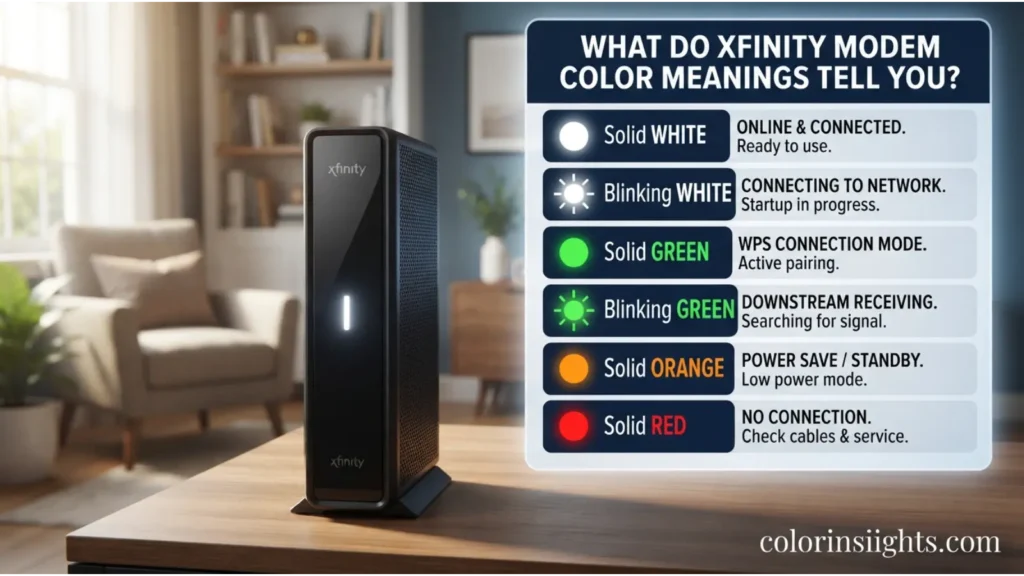
The following Xfinity modem color meanings chart gives you a quick reference before you begin troubleshooting.
| Xfinity Modem Light | Common Interpretation | Recommended Action |
|---|---|---|
| Solid White | Commonly indicates normal operation | Usually no action needed |
| Blinking White | Startup, activation, or connection process may be occurring | Wait; troubleshoot if it persists |
| Blue | Often associated with WPS on compatible gateways | Check whether WPS was activated |
| Blinking Blue | Commonly indicates WPS pairing | Allow pairing to complete |
| Orange/Amber | May appear during startup or connection activity | Wait and monitor |
| Blinking Orange | May indicate ongoing connection/startup activity | Check service and cables if persistent |
| Green | Meaning can vary by equipment | Check the model and operating state |
| Blinking Green | May indicate connection activity on some equipment | Investigate if internet is unavailable |
| Red | Can indicate a condition requiring attention on supported equipment | Check service and connections |
| No Light | Possible power, LED-setting, or equipment issue | Check power and gateway status |
Important: Xfinity has supplied several gateway generations. Therefore, treat this chart as a troubleshooting guide rather than a universal set of error codes.
What Do Xfinity Modem Color Meanings Tell You?
Xfinity Gateway lights provide visual clues about the device’s current operating state.
Depending on the model, they may help identify:
- Normal operation
- Startup
- Activation
- Internet connection activity
- WPS pairing
- Connection attempts
- Power status
- Possible service problems
However, color alone rarely tells the complete story.
For instance, solid white and blinking white can indicate different states. Likewise, blinking blue often relates to WPS rather than an internet outage.
Therefore, check four things before troubleshooting:
- Light color
- Solid or blinking pattern
- How long the pattern continues
- Whether your internet works
Additionally, identify your Xfinity Gateway model whenever possible.
Xfinity Modem Color Meanings: White Light
A white Xfinity modem light commonly appears during normal gateway operation or certain transitional states.
However, the blinking pattern makes an important difference.
Xfinity Modem Solid White Light Meaning
A solid white light commonly indicates normal operation on many Xfinity Gateways.
If the light remains steady and your:
- Internet works,
- Wi-Fi devices connect,
- Gateway stays online,
you usually do not need to troubleshoot anything.
In other words, steady white is generally a reassuring status when everything else works normally.
Xfinity Modem Blinking White Light Meaning
A blinking white Xfinity modem light may appear during startup, activation, or another connection-related process.
First, allow the gateway time to finish what it is doing.
However, if blinking continues and your internet remains unavailable, check:
- Coaxial cable
- Power connection
- Xfinity service status
- Gateway activation
- Loose connectors
Afterward, restart the gateway if appropriate.
Xfinity Modem Color Meanings: Blue Light
A blue Xfinity modem light commonly relates to Wi-Fi Protected Setup (WPS) on compatible gateways.
WPS helps compatible wireless devices connect through a simplified pairing process.
Therefore, blue does not automatically signal an internet problem.
Xfinity Modem Blinking Blue Light Meaning
A blinking blue Xfinity modem light commonly indicates active WPS pairing on supported Xfinity Gateways.
During pairing:
- The gateway enters WPS mode.
- A compatible Wi-Fi device attempts to connect.
- Pairing either succeeds or eventually times out.
If you intentionally activated WPS, allow the process to finish.
On the other hand, if you started WPS accidentally, you generally do not need to factory-reset the gateway. Instead, allow the pairing process to end or follow the instructions for your specific model.
Xfinity Modem Color Meanings: Orange Light
An orange or amber Xfinity modem light may appear while some equipment starts or attempts to establish connectivity.
Nevertheless, orange does not have one universal meaning across every Xfinity device.
Xfinity Modem Blinking Orange Light Meaning
A blinking orange Xfinity modem light may indicate ongoing startup or connection activity on certain equipment.
If you recently restarted your gateway, wait for the startup process to finish.
However, if orange blinking continues and the internet remains offline:
- Check the coaxial cable.
- Secure the power connection.
- Inspect cables for visible damage.
- Check Xfinity service status.
- Restart the gateway once if necessary.
Persistent problems may require model-specific troubleshooting.
Xfinity Modem Color Meanings: Green Light
A green Xfinity modem light requires additional context because Xfinity equipment can use green indicators differently.
For example, older devices may behave differently from newer xFi Gateways.
Therefore, avoid assuming:
Green always means the internet is working.
Instead, identify:
- Gateway model
- Light location
- Solid or blinking state
- Current internet status
Together, these details provide a more useful diagnosis.
Xfinity Modem Blinking Green Light Meaning
A blinking green Xfinity modem light may indicate startup or connection activity on certain equipment.
If your internet works normally, the light may simply reflect device activity.
However, investigate further when blinking green occurs alongside:
- No internet
- Repeated disconnections
- Failed activation
- Connection instability
First, check your cables and Xfinity service status. Then, restart the gateway if necessary.
Xfinity Modem Color Meanings: Red Light
A red Xfinity modem light can indicate a condition that requires attention on equipment that uses a red status indicator.
If you see red while the internet is unavailable, check the connection systematically.
How to Troubleshoot a Red Xfinity Modem Light
First, check:
- Power
- Coaxial connection
- Service status
- Gateway status
- Recent equipment changes
Next, make sure all connectors remain secure.
If Xfinity reports no service interruption and a normal restart does not restore connectivity, use model-specific support information or contact Xfinity.
Avoid repeatedly factory-resetting the gateway.
Xfinity Modem Color Meanings: No Light
No visible status light does not always mean the same thing either.
Possible explanations include:
- No electrical power
- Loose power cable
- Outlet problem
- Gateway turned off
- LED brightness or settings
- Model-specific behavior
- Hardware issue
What to Check When Your Xfinity Modem Has No Light
Start with the power source.
Next, look for other signs that the gateway is operating:
- Wi-Fi network availability
- Ethernet activity
- Connected devices
- Gateway status in the Xfinity app
If the device appears completely unpowered, test the power connection before troubleshooting the internet service itself.
Xfinity Modem Light Meanings: Solid vs. Blinking
Understanding solid versus blinking Xfinity modem lights can prevent unnecessary troubleshooting.
Solid Xfinity Modem Light Meanings
A solid light generally represents a more stable operating state.
For example, steady white commonly accompanies normal operation on many gateways.
However, always interpret the color according to your model.
Blinking Xfinity Modem Light Meanings
Blinking usually indicates an active process.
Possible processes include:
- Startup
- Activation
- Network connection
- WPS pairing
- Synchronization
- Troubleshooting states
Therefore, blinking does not automatically mean the modem is broken.
Duration matters too. Brief blinking after a restart can be normal, whereas persistent blinking combined with no internet may require troubleshooting.
Xfinity Modem Color Meanings During Startup
Your gateway may display different light behaviors after you turn it on or restart it.
During startup, the device needs time to initialize its hardware and establish network connectivity.
The process may involve:
- Hardware initialization
- Network synchronization
- Service authentication
- Configuration
- Internet connection
- Wi-Fi initialization
Consequently, the light may blink or change temporarily.
Avoid unplugging the gateway repeatedly during startup. Each interruption can restart the process.
Instead, allow it enough time to initialize before deciding that something is wrong.
Xfinity Modem Color Meanings During WPS Pairing
WPS pairing can explain an unexpected blue light.
On compatible Xfinity Gateways, blinking blue commonly accompanies WPS pairing.
What Happens During WPS Pairing?
First, the gateway enters pairing mode.
Next, the compatible Wi-Fi device attempts to connect.
Finally, the process completes or times out.
If you intentionally started WPS, follow the connection instructions for your wireless device.
However, if WPS started accidentally, do not immediately factory-reset your gateway. Allow pairing to end or cancel it according to your model’s instructions.
Xfinity Modem Color Meanings for Blinking Lights
A blinking Xfinity Gateway can mean several things depending on the color.
Common causes include:
- Startup
- Activation
- Connection attempts
- WPS pairing
- Network synchronization
- Temporary connectivity issues
- Model-specific operations
Therefore, use a simple three-question check:
What color is blinking?
Does my internet currently work?
Did I recently restart, activate, or pair a device?
These questions narrow the problem much more effectively than treating every blinking light as an error.
Xfinity Modem Color Meanings When Internet Is Down
If your internet stops working, the gateway light provides one useful clue. However, you should combine it with other checks.
Check Multiple Devices
First, test your connection on another phone, computer, or tablet.
If only one device cannot connect, the problem may involve that device rather than your Xfinity Gateway.
Check Xfinity Service Status
Next, determine whether Xfinity reports an interruption in your area.
A network outage can affect your connection even when the gateway itself works correctly.
Check Your Cables
Make sure the:
- Power cable is secure.
- Coaxial cable is tight.
- Ethernet cables remain connected, if used.
- Cables show no obvious damage.
Restart the Gateway
If no outage appears and the cables look secure, restart the gateway.
Then, allow the device to complete its startup process before testing the internet again.

How to Troubleshoot Xfinity Modem Color Meanings
If an unusual light persists, follow a consistent troubleshooting sequence rather than randomly changing settings.
Step 1: Identify the Xfinity Modem Light
Record:
- Color
- Solid or blinking
- Duration
Also note whether your internet works.
Step 2: Check for an Xfinity Service Outage
Before resetting equipment, check Xfinity’s official service status.
If the external network has an outage, changing your gateway settings will not repair it.
Step 3: Check Physical Connections
Inspect the:
- Power cable
- Coaxial cable
- Ethernet cables
Then, secure any loose connections.
Step 4: Restart Your Xfinity Gateway
Perform a normal restart when appropriate.
Afterward, give the gateway enough time to reconnect.
Step 5: Test Several Devices
Test Wi-Fi on more than one device.
If available, you can also compare Wi-Fi and Ethernet connectivity.
Step 6: Get Model-Specific Help
If the problem remains, identify the exact gateway model and consult official Xfinity support information.
This final step helps avoid applying instructions for the wrong device.

Xfinity Modem Color Meanings by Gateway Model
Xfinity has supplied several generations of gateway equipment.
Common model families include:
- XB3
- XB6
- XB7
- XB8
- Other compatible devices
These models can differ in:
- Hardware
- LEDs
- Ports
- Firmware
- Features
- Status-light behavior
Therefore, Xfinity modem color meanings are not necessarily identical across XB3, XB6, XB7, and XB8 equipment.
How to Find Your Xfinity Gateway Model
Look for the model through:
- Device label
- Xfinity app
- Account equipment information
- Hardware documentation
Once you identify it, use instructions written specifically for that model whenever possible.
Xfinity Modem Color Meanings vs. Router Light Meanings
People frequently use Xfinity modem, Xfinity router, and Xfinity Gateway as though they mean exactly the same thing.
Technically, they describe different networking functions.
What Is a Modem?
A modem connects your home network to your internet service.
What Is a Router?
A router distributes the network connection among your devices.
What Is an Xfinity Gateway?
An Xfinity Gateway generally combines modem and router functionality into one device.
Therefore, someone searching for Xfinity router light meanings may actually want information about the status LED on an Xfinity Gateway.
Identifying the equipment correctly makes troubleshooting easier.

Xfinity Modem Color Meanings and Restarting the Gateway
A normal restart can resolve temporary connectivity problems.
Consider restarting when:
- Internet suddenly stops.
- Multiple devices lose connectivity.
- A transitional light persists.
- Wi-Fi becomes unstable.
- Xfinity troubleshooting recommends a restart.
However, do not repeatedly restart the gateway during a confirmed service outage.
A local reboot cannot repair an external Xfinity network problem.
Xfinity Modem Color Meanings and Factory Resetting
A restart and factory reset are not the same thing.
Restarting reboots the gateway. In contrast, a factory reset can restore configuration settings to their defaults.
Therefore, do not factory-reset the gateway simply because its LED changes color.
Before considering a reset:
- Check Xfinity service status.
- Check cables.
- Perform a normal restart.
- Identify the gateway model.
- Review official Xfinity troubleshooting instructions.
Use a factory reset only when it is appropriate for your specific situation.

When Xfinity Modem Light Problems Require Support
Sometimes basic troubleshooting cannot solve the problem.
Consider contacting Xfinity when:
- Startup never completes.
- Internet remains unavailable.
- An unusual light persists.
- Multiple devices cannot connect.
- The gateway disconnects repeatedly.
- Equipment appears damaged.
- Activation fails.
- Official troubleshooting recommends support.
Before contacting support, note your gateway model, light color, blinking pattern, and internet status.
For example:
“My XB8 Gateway keeps blinking white, and none of my devices can access the internet.”
That information gives support a clearer starting point.
FAQs:
What do Xfinity modem color meanings indicate?
Xfinity modem colors provide clues about normal operation, startup, connectivity, pairing, and possible problems. However, the exact interpretation depends on the gateway model and whether the light is solid or blinking.
What color should my Xfinity modem be?
A steady white light commonly accompanies normal operation on many Xfinity Gateways. Nevertheless, confirm the expected light behavior for your specific model.
What does a white Xfinity modem light mean?
Solid white commonly indicates normal operation on many Xfinity Gateways. Meanwhile, blinking white may occur during startup, activation, or connection changes.
What does a blinking blue Xfinity modem light mean?
Blinking blue commonly indicates WPS pairing on compatible Xfinity Gateways.
What does an orange Xfinity modem light mean?
Orange or amber may appear during startup or connection activity on some Xfinity equipment. If it persists while your internet remains offline, check the gateway model, cables, and service status.
Why is my Xfinity modem blinking orange?
The gateway may still be starting or trying to establish connectivity. Therefore, allow startup to finish first. If the problem continues, check Xfinity service status and physical connections.
What does a green Xfinity modem light mean?
Green-light behavior can vary by Xfinity equipment. Check whether the light is solid or blinking and identify your gateway model before interpreting it.
What does a red Xfinity modem light mean?
A red status light on equipment that supports one can indicate a condition requiring attention. Check your internet service, cables, gateway status, and model-specific Xfinity guidance.
Why is my Xfinity modem blinking white?
Blinking white may occur during startup, activation, or connection activity. However, persistent blinking combined with no internet can require troubleshooting.
Why does my Xfinity modem have no light?
The gateway may have lost power, have a loose power connection, use different LED behavior, or have another equipment issue. First, confirm whether the gateway itself is powered.
Does a blinking Xfinity modem mean it is broken?
No. Blinking can occur during normal startup, pairing, activation, and connection processes. Therefore, consider the color, duration, model, and internet status together.
Should I restart my Xfinity modem if the light changes?
Not necessarily. A temporary light change may occur during normal operation. However, if internet access fails and an unusual light persists, checking service status and then restarting may help.
Should I factory-reset an Xfinity modem with an unusual light?
Usually not as the first step. Check the service status and cables, then try a normal restart before considering a factory reset.
Are Xfinity modem color meanings the same on XB6, XB7, and XB8?
Not necessarily. Different gateway generations can use different hardware, firmware, and LED behaviors. Therefore, use model-specific Xfinity support information whenever possible.
Conclusion
Understanding Xfinity modem color meanings can make basic internet troubleshooting easier. A steady white light commonly accompanies normal operation on many Xfinity Gateways, while blinking white may appear during startup, activation, or connection changes. Meanwhile, blinking blue commonly relates to WPS pairing on compatible gateways.
However, orange, green, red, and other light behaviors can vary according to the equipment and operating state. Therefore, do not diagnose a connection problem from color alone. Instead, check whether the light is solid or blinking, whether your internet works, how long the behavior continues, and which gateway model you own.
If your connection fails, first check Xfinity service status. Next, inspect the physical connections and perform a normal restart when appropriate. Finally, use model-specific Xfinity guidance if the problem continues.
Ultimately, Xfinity modem color meanings work best as troubleshooting clues rather than universal error codes.